The GeoPortal Data Entry App is a technology to publish and manage spatio-temporal projects in the Geoportal D4Science service
Go to file
Francesco Mangiacrapa 737aa824fb updated toc 2025-08-07 17:01:26 +02:00
.settings Updated Eclipse project settings 2025-08-05 09:31:28 +02:00
src Updated Eclipse project settings 2025-08-05 09:31:28 +02:00
.classpath Updated Eclipse project settings 2025-08-05 09:31:28 +02:00
.gitignore project created 2020-10-07 17:04:13 +02:00
.project Fixed the Update facility [#29518] 2025-07-03 15:19:54 +02:00
CHANGELOG.md removed -SNAPSHOT to be released 2025-08-04 14:46:53 +02:00
CITATION.cff removed -SNAPSHOT to be released 2025-07-03 17:11:46 +02:00
DEVELOPER.MD updated documentation 2025-08-07 15:32:25 +02:00
FUNDING.md updated FUNDING and README 2025-05-30 14:57:19 +02:00
LICENSE.md updated FUNDING and README 2025-05-30 14:57:19 +02:00
README.md updated toc 2025-08-07 17:01:26 +02:00
descriptor.xml removed -SNAPSHOT to be released 2025-07-03 17:11:46 +02:00
pom.xml removed -SNAPSHOT to be released 2025-08-04 14:46:53 +02:00
profile.xml project created 2020-10-07 17:04:13 +02:00

README.md

GeoPortal Data Entry App

The Geoportal Data Entry App is a comprehensive web application for managing spatio-temporal documents through "Use Case Descriptors" (UCD) that define their model, lifecycle, and management properties. It provides an intuitive interface for creating, editing, and managing research projects within the gCube Geoportal system.

Overview

This application serves as the primary entry point for researchers and data managers to create and manage complex geospatial projects. It supports the complete data entry workflow from initial project creation through publication, with built-in validation, file management, and relationship handling capabilities.

The Geoportal data-entry technology enables users to manage spatio-temporal documents through "Use Case Descriptors" (UCD) that define their model, lifecycle, and management properties. The system provides comprehensive functionality to:

  • Role-based Project Access: Search and access published projects based on VRE role permissions
  • Publication Reports: Monitor project publication status with detailed SUCCESS, WARNING, and ERROR reporting
  • Map Visualization: Generate links for geographic visualization of spatial data
  • Content Updates: Modify registered project contents through configurable workflows
  • Relationship Management: Create and manage temporal and qualitative relationships between documents

The technology supports data entry for any document with spatio-temporal characteristics, where metadata structure and payload are defined by one or more gCube Profile configurations that determine the resulting JSON document structure.

Table of Contents

Showcase

D4GNA Instance - Dataset per il Geoportale Nazionale per l'Archeologia

Available at D4GNA - Geoportale Nazionale per l'Archeologia, the Data Entry App is accessible to authorized users within the GNA Virtual Research Environment.

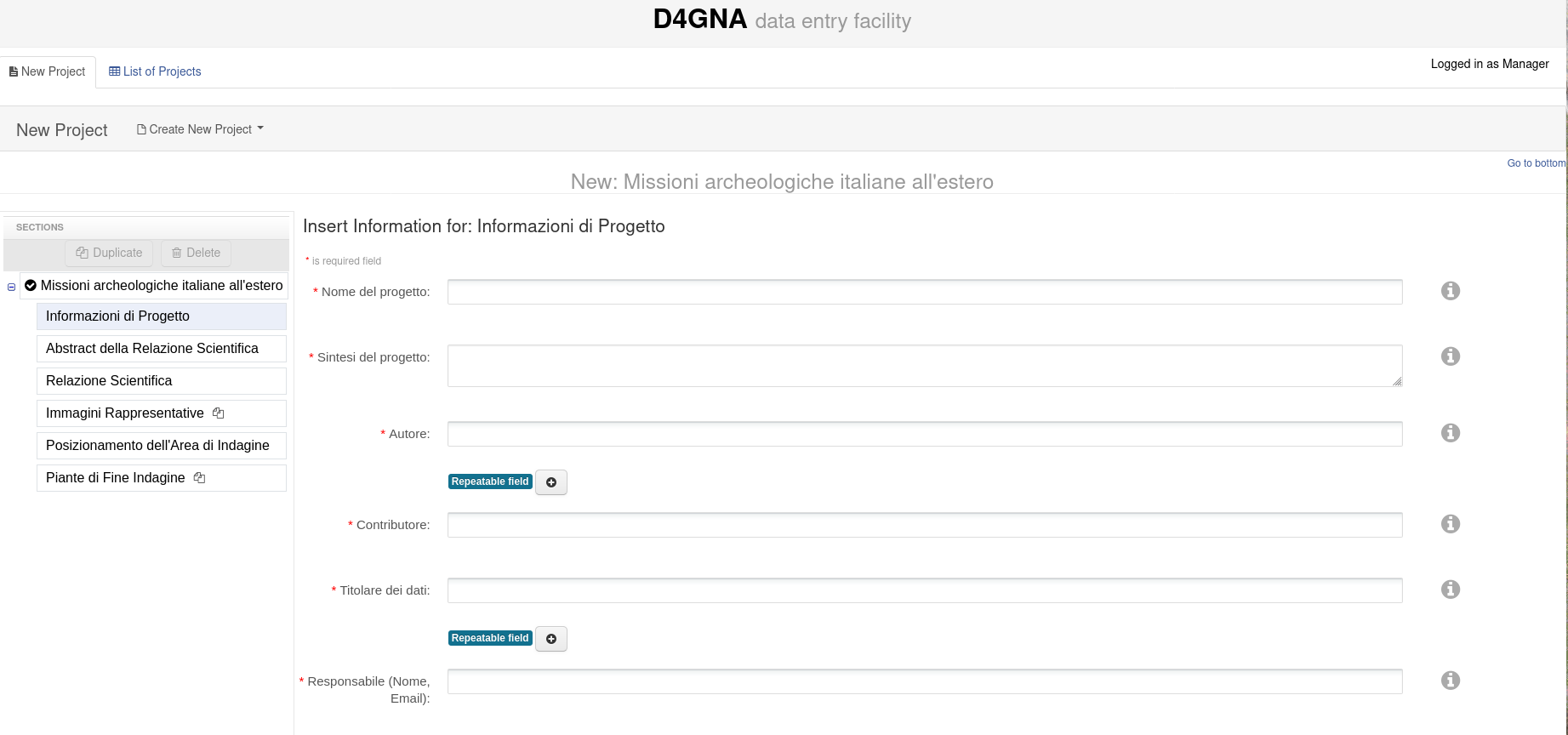
New Project Creation Facility

New Project Creation Interface

The interface provides:

  • Project Type Selection: Choose from available archaeological project types
  • Dynamic Form Generation: Forms automatically generated based on UCD specifications
  • Step-by-step Wizard: Guided project creation with validation at each step
  • File Upload Integration: Associate files directly with metadata fields

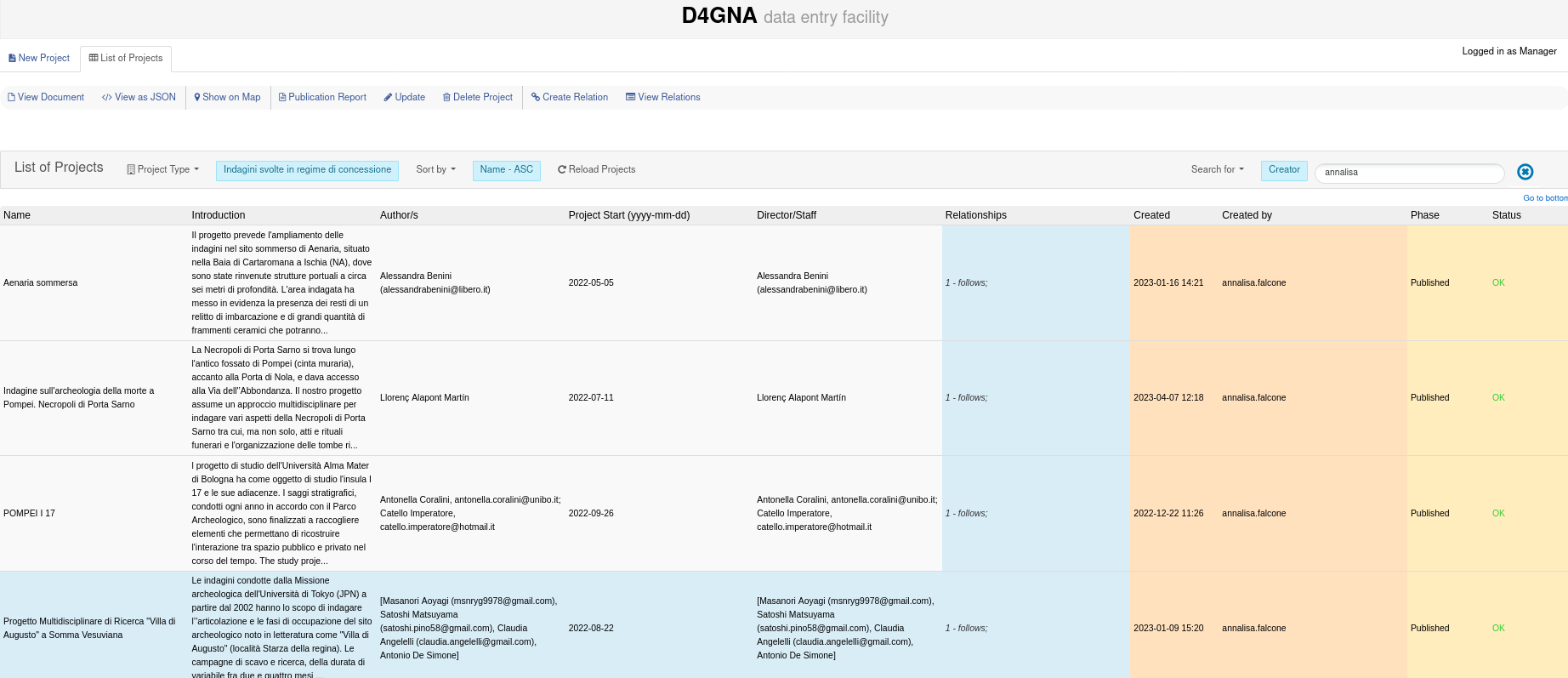
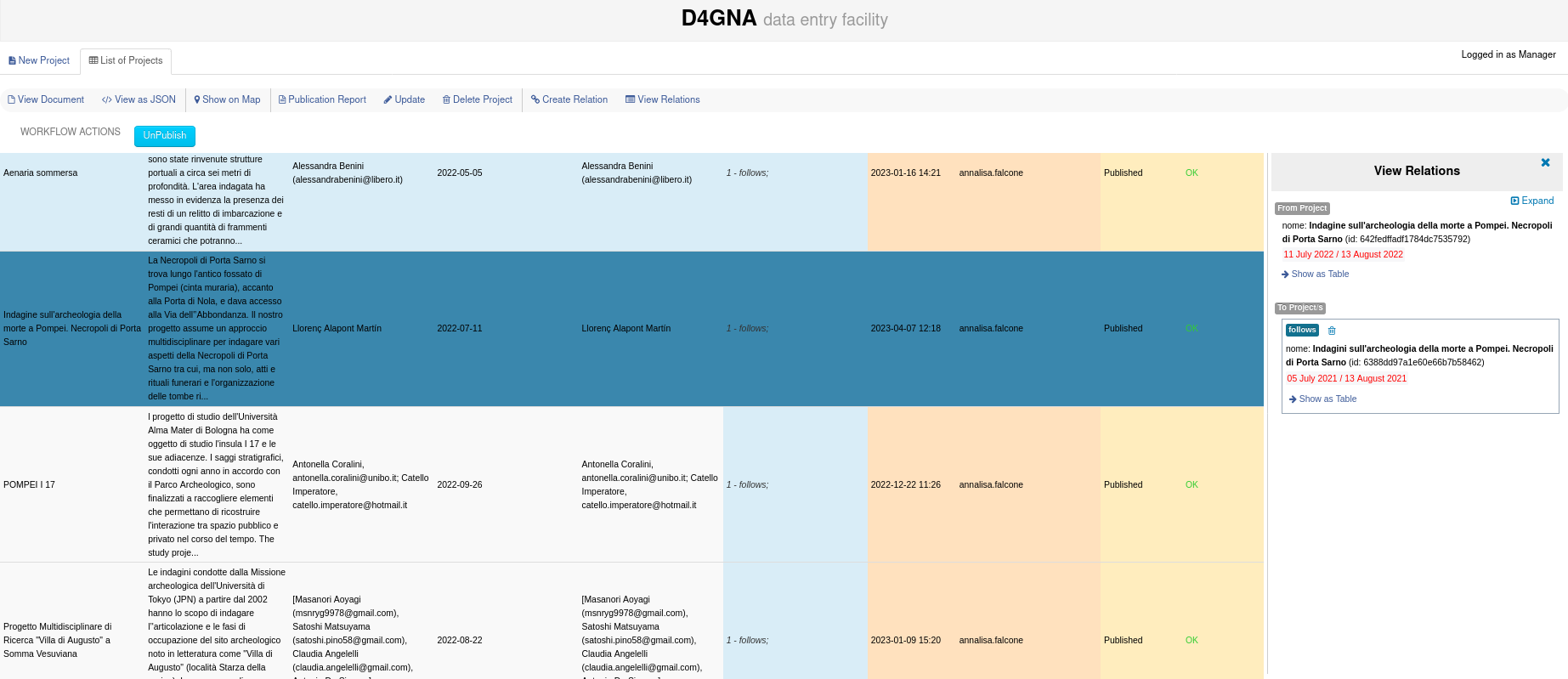
Project List Management

Projects List Interface

Key features shown:

  • Filterable Project List: Search and filter projects by various criteria
  • Status Indicators: Visual indicators for project phase and publication status
  • Workflow Actions: Context-aware buttons based on user roles and project state

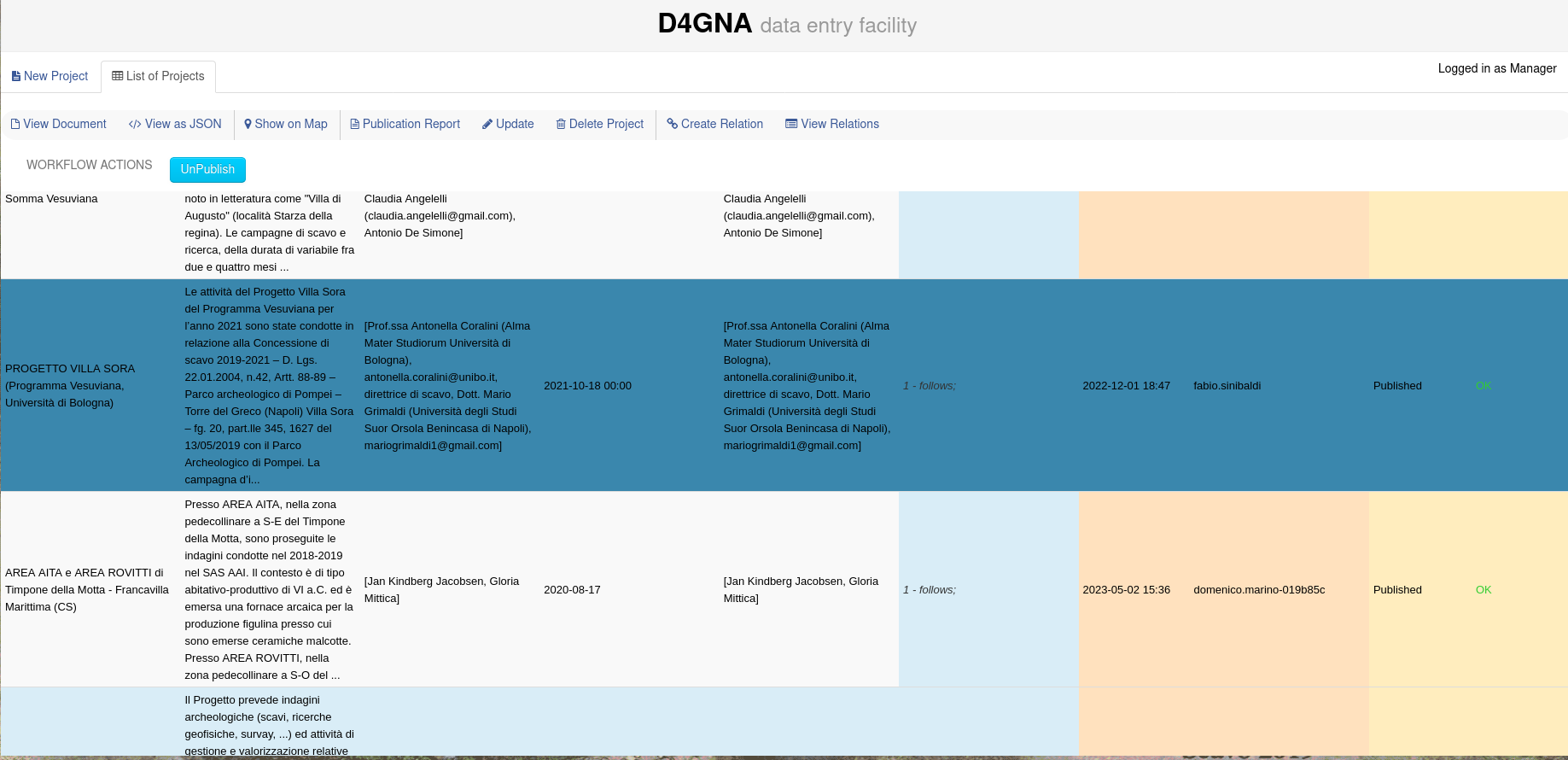
Publication Management

Publication Management

Demonstrates:

  • Lifecycle Management: Control publication state with approve/reject/unpublish actions
  • Role-based Access: Different actions available based on user permissions
  • Publication Reports: Detailed feedback on publication process and status

Relationship Management

Relationships Visualization

Features include:

  • Visual Relationship Mapping: Interactive diagram of project connections
  • Relationship Types: Support for temporal, spatial, and semantic relationships
  • Bidirectional Links: Create and manage relationships between projects
  • Relationship Browser: Navigate through connected projects and their properties

Key Features

📋 Project Management

  • Dynamic Form Generation: Create data entry forms based on UCD configurations and gCube profiles
  • Multi-section Projects: Support for complex projects with repeatable and nested metadata sections
  • Validation Engine: Real-time form validation with error reporting and user feedback
  • Project Lifecycle: Comprehensive workflow management from draft to publication

🔐 Role-based Access Control

  • VRE Integration: Seamless integration with Virtual Research Environment roles
  • Permission-based Operations: Fine-grained access control for create, read, update, delete operations
  • User Context Management: Automatic user context and session handling

📂 Advanced File Management

  • Multi-format Support: Handle various file types (GIS data, documents, images, CSV, etc.)
  • Remote File Handling: Support for both local uploads and remote file URLs
  • StorageHub Integration: Seamless integration with gCube StorageHub for file archiving
  • FileSet Organization: Group and manage related files with metadata associations

🔄 Workflow & Lifecycle Management

  • Multi-phase Workflows: Support for 2-phase (Draft → Published) and 3-phase (Draft → Pending Approval → Published) lifecycles
  • Step-based Operations: Configurable lifecycle steps (submit-for-review, approve, reject, publish, unpublish)
  • Post-creation Actions: Automated workflow steps triggered after project creation
  • Publication Reports: Detailed reporting on publication status with error/warning tracking

🗺️ Geospatial Features

  • Map Visualization: Generate links for geographic visualization of spatial data
  • Spatial Relationships: Handle temporal and qualitative relationships between documents
  • GeoServer Integration: Automatic spatial data indexing and visualization

🔗 Project Relationships

  • Relationship Creation: Create and manage relationships between projects
  • Temporal Relationships: Support for time-based project connections
  • Qualitative Links: Handle semantic relationships between documents
  • Relationship Visualization: Dedicated interface for viewing and managing project connections

⚙️ Technical Features

  • UCD Framework: Flexible Use Case Descriptor system for defining project schemas
  • REST API Integration: Full integration with Geoportal Service REST APIs
  • Extensible Architecture: Plugin-based system for custom functionality

Built With

Technical Architecture

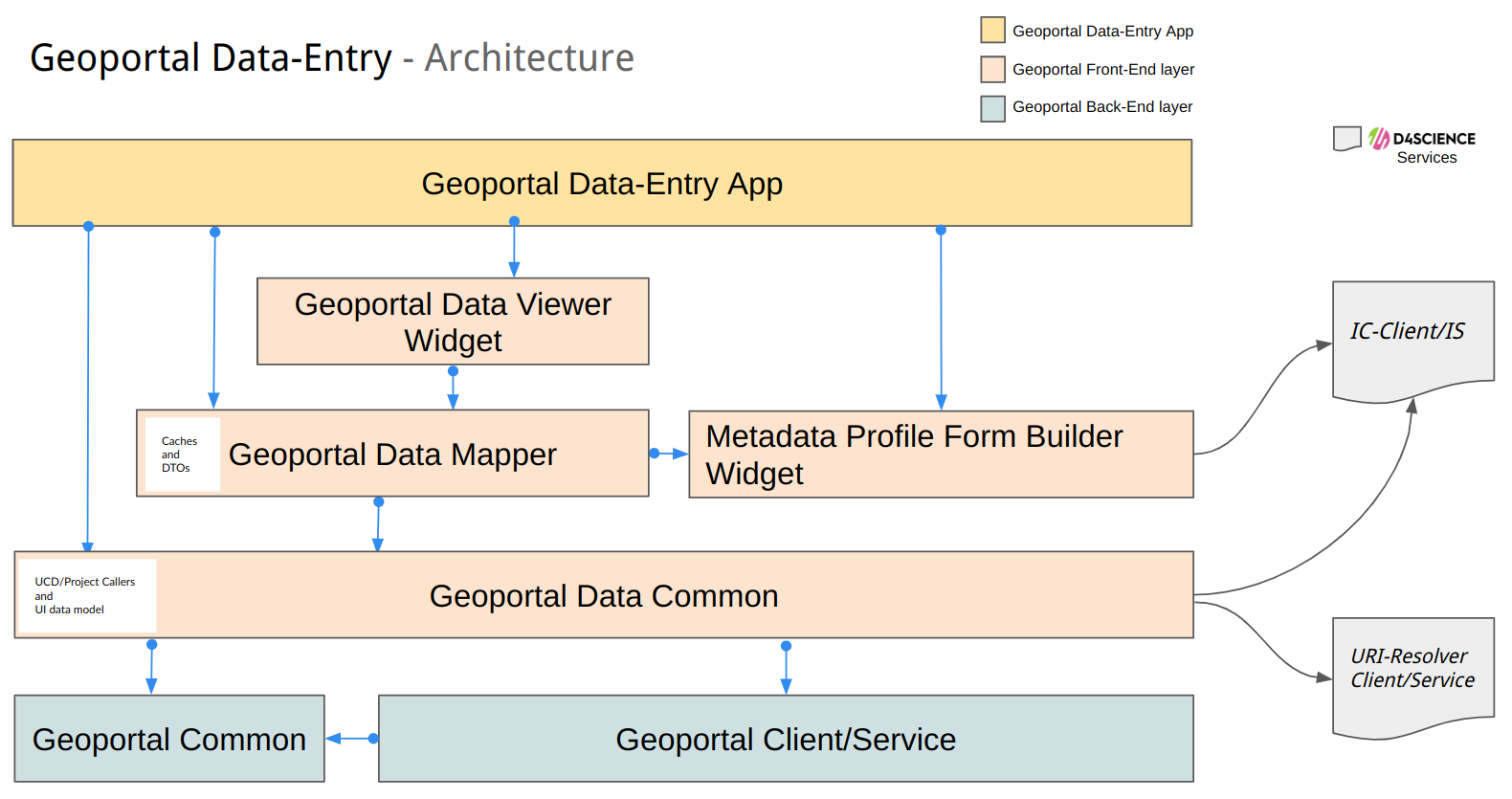
The GeoPortal Data Entry App follows a layered architecture pattern:

GeoPortal Data-Entry - Architecture

see more at DEVELOPER.MD

Use Case Descriptor (UCD) Framework

The application leverages Use Case Descriptors to define:

  • Metadata Schema: JSON-based schema definition for project structure
  • Form Configuration: Field types, validation rules, and UI layout
  • Workflow Definition: Lifecycle phases and available actions
  • File Management: FileSet definitions and upload constraints
  • Access Control: Role-based permissions for operations and data access
  • GUI Integration: Custom interface configurations per project type

the UCD framework is implemented by gCube CMS Suite

Example UCD Structure

{
    "_id": "concessione",
    "_name": "Concessione",
    "_version": "1.0.0",
    "_description": "Archaeological concession management",
    "_schema": {
        "abstractRelazione": {
            "_min": 1,
            "_children": [
                { "filesetIta": { "_type": "RegisteredFileSet", "_min": 1 } },
                { "filesetEng": { "_type": "RegisteredFileSet" } },
                { "title": { "_min": 1 } }
            ]
        },
        "relazioneScavo": {
            "_max": 1,
            "_min": 1,
            "_children": [
                { "fileset": { "_type": "RegisteredFileSet", "_min": 1 } },
                { "title": { "_min": 1 } }
            ]
        }
    },
    "_dataAccessPolicies": [
        {
            "_policy": { "_read": "any", "_write": "any" },
            "_roles": ["Data-Manager"]
        },
        {
            "_policy": { "_read": "own", "_write": "own" },
            "_roles": ["Data-Editor"]
        }
    ],
    "_handlers": [
        {
            "_id": "GNA-CONCESSIONI-LC",
            "_type": "LifecycleManagement",
            "_configuration": {
                "step_access": [
                    { "STEP": "SUBMIT-FOR-REVIEW", "roles": [] },
                    { "STEP": "APPROVE-SUBMITTED", "roles": ["Data-Manager"] }
                ]
            }
        },
        {
            "_id": "SDI-Default-Materializer",
            "_type": "Materializer",
            "_configuration": {
                "registeredFileSetPaths": [
                    {
                        "schemaField": "posizionamentoScavo",
                        "documentPath": "posizionamentoScavo.fileset"
                    }
                ]
            }
        }
    ]
}

Workflow Process Example

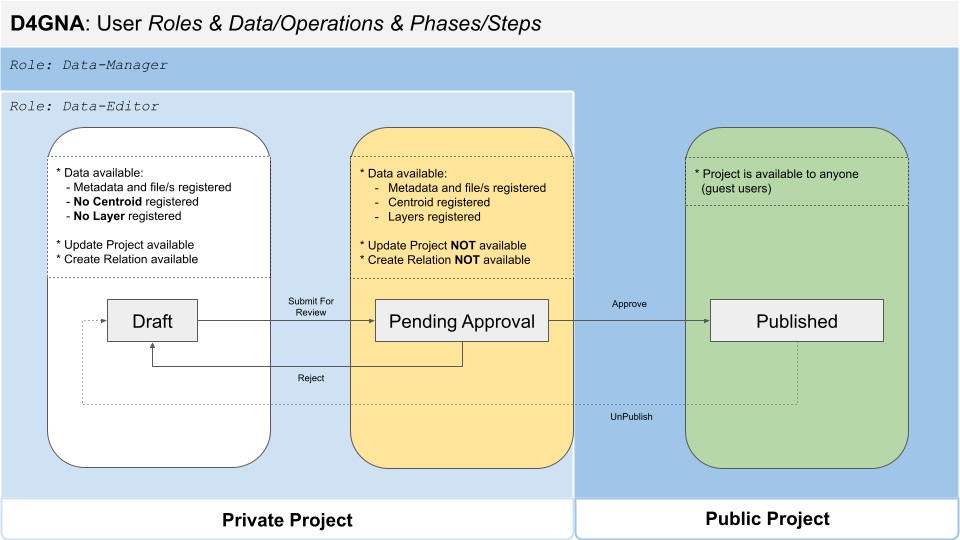
The D4GNA implementation showcases a 3-Phase Lifecycle:

D4GNA Workflow Phases and Operations
  1. DRAFT Phase:

    • Project creation and editing
    • File uploads and metadata entry
    • Internal validation and preparation
  2. PENDING APPROVAL Phase:

    • Submit for review action
    • Moderation and quality control
    • Integration with discovery services for authenticated users
    • Expert validation and feedback
  3. PUBLISHED Phase:

    • Public accessibility
    • Integration with discovery services for public users
    • Automated indexing and cataloging

Documentation and Resources

Technical Documentation

User Guides

  • D4GNA User Guide (Italian): Guida al Sistema D4GNA
  • Project Lifecycle Management: Understanding workflow phases and operations
  • UCD Configuration: Guide for administrators on setting up Use Case Descriptors

Change log

See the Releases

Authors

How to Cite this Software

Tell people how to cite this software.

  • Cite an associated paper?
  • Use a specific BibTeX entry for the software?
    @Manual{,
        title = {GeoPortal Data Entry App},
        author = {Francesco Mangiacrapa at ISTI-CNR Infrascience Group},
        organization = {ISTI - CNR},
        address = {Pisa, Italy},
        year = 2025,
        note = {The Geoportal Data Entry technology enables users to manage spatio-temporal documents through "Use Case Descriptors" that define their model and lifecycle. It supports role-based project access, publication reports, map visualization links, content updates via workflows, and management of temporal relationships between documents},
        url = {https://code-repo.d4science.org/gCubeSystem/geoportal-data-entry-app}
    } 

License

This project is licensed under the terms specified in the LICENSE.md file

About the gCube Framework

This software is part of the gCubeFramework: an open-source software toolkit used for building and operating Hybrid Data Infrastructures enabling the dynamic deployment of Virtual Research Environments by favouring the realisation of reuse oriented policies.

The projects leading to this software have received funding from a series of European Union programmes see FUNDING.md